Create with open AI.
Make it your own.
Make images, music, voiceovers, sound effects, voice swaps and short videos just by describing what you want, or build an AI model tailored to your needs. Your own copy, on your own machine, without a hosted provider's request quotas.
No coding needed to create: everything happens in your browser.
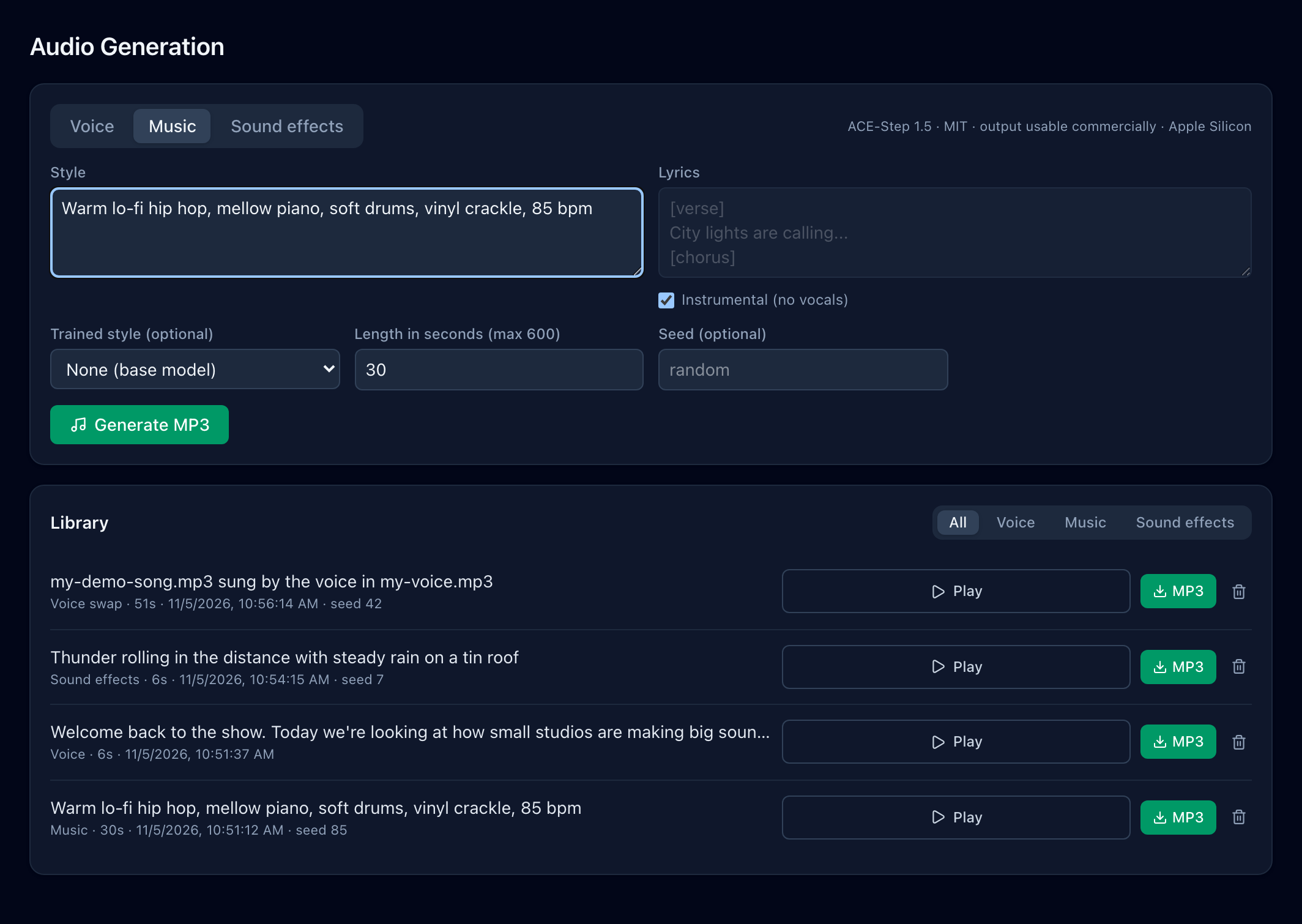
The real Audio Generation page in AI Studio, showing tracks it generated.
Describe it. Generate it. Use it.
Creating in AI Studio works like filling in a short form: no code, no command line, everything in your browser.
-
Step 1: Pick what to make
An image, a voiceover, a song, a sound effect, a voice swap or a short video. Each has its own page with the options laid out in front of you.
-
Step 2: Describe it in plain words
Type what you want, paste lyrics or a script, or upload a recording. For voices, you can record yourself right in the page.
-
Step 3: Play, download, use
Watch the progress while it works. Your result lands in your library with a built-in player, ready to download as an MP3, image or MP4.
- No coding to create
- Works in your browser
- Record your voice in the page
- Everything saved in your library
Installing AI Studio is a one-time setup, with step-by-step guides. After that, creating is point and click.
Open models, your models, your rules
Hosted AI is quick to start with, but the model, the limits and the data handling belong to someone else. Running your own copy puts those decisions back with you.
Start from open models
Pull open text models through Ollama and try them in a chat playground. Images, speech, music, sound effects and video run on open models too.
- Add, remove and switch models without changing providers
- Ground answers in your own documents, with cited sources
- Compare models with automated evaluation
Create a model that's yours
Turn your documents, a written goal or a codebase into a reviewed training dataset, then fine-tune an open model on it.
- Approve, edit or reject every example before training
- LoRA fine-tuning, with the result added to your models automatically
- Or bake a system prompt into a base model when that's enough
Control over usage and deployment
The platform doesn't meter or cap your requests. How much you generate depends on your hardware, and you decide where it runs and who can use it.
- Runs on your own machine or server
- Your documents, datasets and outputs stay on it
- Roles, revocable API keys and an audit log for teams
From an open model to your own, in three steps
Want an AI that speaks your language? Each step is a page in the app, with a review step wherever your data is involved.
-
Step 1: Choose a model
- Pull and manage open models from the Model Registry
- Try them in the conversation playground, optionally grounded in your documents
- Score them against your examples with automated evaluation
-
Step 2: Make it yours
- Generate training examples from documents, a goal, or a codebase
- Review every example before it's used
- Fine-tune with LoRA: MLX on Apple Silicon, Unsloth on NVIDIA GPUs
-
Step 3: Generate and integrate
- Chat with your model, with retrieval over your knowledge base
- Call it from your apps through OpenAI-compatible endpoints and API keys
- Send good conversations back into the dataset to keep improving it
Call your models from your own apps
Everything you build is available through OpenAI-compatible endpoints for chat, model listing and image generation, secured with API keys you issue and revoke yourself. Existing SDKs and tools can point at your own server.
$ curl http://localhost:8000/v1/chat/completions \
    -H "Authorization: Bearer jz_live_…" \
    -d '{"model": "support-assistant:v1",
           "messages": [{"role": "user",
"content": "How do I reset my router?"}]}'Illustrative example: calling a model you fine-tuned through the OpenAI-compatible API on your own server.
Images, audio and video for everyone, and much more
Whether you're making a song, a voiceover, an image or a short video, swapping the voice on a track, or building an assistant for your business, it all happens in one studio, on open models running on your own hardware.
-
Images, in your own style
Generate images from text with Stable Diffusion 1.5 or SDXL. Upload your own pictures, which are captioned automatically for review, and train a LoRA that learns a subject or style.
Try“A cosy reading nook with warm afternoon light, watercolour style”
-
Voiceovers and narration
Turn scripts of any length into natural speech. Build a voice from recordings of a speaker who has given consent, uploaded or recorded right in the browser. Every clip carries an inaudible watermark marking it as AI-generated.
For exampleNarration for a training video, read in your presenter's voice.
-
Music and full songs
Describe a style, add lyrics or keep it instrumental, and get a finished track as an MP3, from short loops to songs several minutes long. Train a style on music you own to make the results your own.
Try“Warm lo-fi hip hop, mellow piano, vinyl crackle, 85 bpm”
-
Sound effects
Create sound effects up to 30 seconds long from a plain description, for games, videos and apps. Fine-tune on your own sound library to match its character.
Try“Thunder rolling in the distance with steady rain on a tin roof”
-
Voice swap for songs
Replace the singer in a song with a voice from a short recording. The melody, timing and words stay the same, and the new vocal is mixed back over the original music. Requires the voice owner's consent and rights to the song.
For exampleHear your own demo song sung in your voice instead of a guide vocal.
-
Short video clips
Generate clips of up to five seconds from a text prompt with Wan 2.2, at 480p or 720p, in landscape or portrait, saved as MP4.
Try“A paper boat drifting down a rain-soaked street, cinematic close-up”
-
Assistants that know your documents
Upload PDFs, Word files, web pages or spreadsheets, and chat with a model that searches them first and shows the sources behind each answer.
For exampleYour product manuals, answering customer questions with the page each answer came from.
-
Specialist models, fine-tuned on your data
Generate training examples from your documents or from a goal you describe, expand them into harder and edge-case variants, review them, and fine-tune an open model with LoRA.
For exampleA model that answers in your support team's tone, or writes short bedtime stories for 5 to 8 year olds.
-
A model that understands your codebase
Import one or more source projects as a zip. Training examples are built from each file together with the files it imports, so the model learns how your modules fit together.
For exampleAn assistant that explains what breaks if an interface in your service changes.
And keep improving what you build
Score models automatically for accuracy, groundedness and hallucinations, keep versioned system prompts in a shared library, and send good conversations back into your training data for the next round.
Hardware notes show what each feature is built for; "Mac" means a Mac with Apple Silicon. The default speech, music, sound-effect and video models were chosen for licences that allow commercial use. Text and image base models keep their own licences, so check each one before commercial use.
For everyone who wants to create with AI
Creators and makers
Musicians, podcasters, video makers, designers, marketers and hobbyists: describe what you want and get images, music, voiceovers, sound effects, voice swaps and short videos, with no coding.
Developers
An OpenAI-compatible API in front of models you control, so existing SDKs and tools can point at your own server instead of a hosted one.
Startups and teams
Shared projects with owner, admin, editor and viewer roles, revocable API keys, and an audit log of every change.
Researchers and learners
Work through every stage of making a model, from dataset to fine-tune to evaluation, on hardware you can inspect and experiment with.
Bring your whole team, or your whole community
One installation of AI Studio can serve many people. Give each member their own sign-in and role, or open your studio to outside users who pay with credits.
Members and roles
Run one studio for your company, school, club or creative group.
- Separate spaces. Each organization gets its own space, and members only see their own organization's projects and creations.
- A role for every member. Owners and admins add members and choose what each one can do: OwnerAdminEditorViewer
- Personal API keys that can be revoked at any time, plus an audit log of every change.
- Fair sharing of one machine. Heavy image, audio and video jobs queue up and run one at a time, so a group can share a single GPU computer.
Offer it as a paid service
Share your studio with users outside your organization over the Nodofi network, and let them pay as they go.
- Credit-based access. Users buy credits once, and each request uses a set number of credits by type: chat, image, voice, music, sound effect or video.
- You set the prices, per credit and per type of request.
- Automatic refunds. If a job fails, its credits are returned in full.
- Get discovered. List your studio on the Nodofi Marketplace, with its models and prices shown.
Paid access runs through the optional Nodofi sharing service, with payments handled by MooChedda. Members and roles work on every installation.